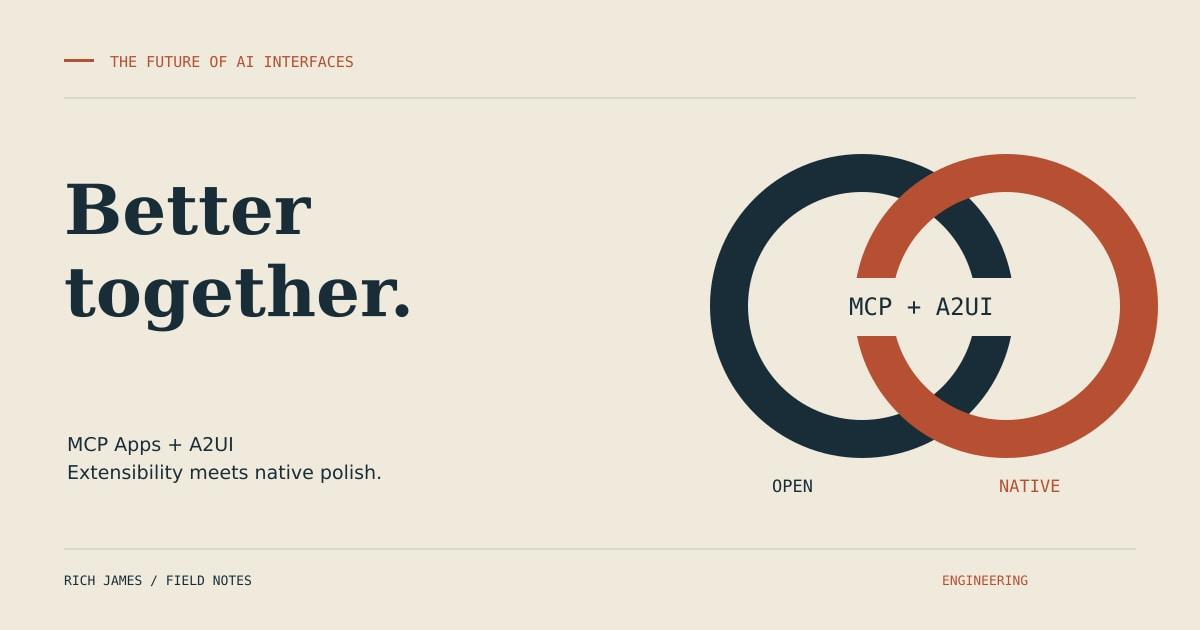
MCP Apps vs A2UI: Better Together
Recently I set about building a POC named AIBank, a demo AI-powered banking app that taught me something important about the current state of AI UI development.
The problem I set out to solve was simple on the surface: prove that AI UIs can feel native while staying extensible. Turns out that's harder than it sounds, because the industry has collectively decided to make us choose between polish and openness. But here's the thing—we don't have to choose. We just need to understand what problems each standard solves, and use them both intelligently.
The Tradeoff
If you're building an AI application today, you're forced into an impossible choice. You can pick only one:
Native feel — The kind of smooth, platform-native UI that makes an app feel like it belongs on your device. Real Flutter widgets on mobile, real SwiftUI on iOS, proper Jetpack Compose on Android. The stuff that makes users forget they're using an AI app and just focus on getting things done.
3rd-party extensibility — The ability for anyone in the ecosystem to plug in new tools, new services, new capabilities. The kind of open plugin architecture that lets your app grow beyond what you initially built.
For time some time, I accepted this as just how things work with mobile development. You pick your battles. You optimise for your users' top priorities and compromise on the rest.
Then I started looking at MCP Apps-ext and A2UI, and something clicked.
Two Standards, Two Problems
Let's talk about what each of these standards actually solves, because the marketing material makes it sound like they're competing visions for the future of AI. They're not.
MCP Apps-ext: Opening the Ecosystem
Anthropic's MCP Apps extension tackles the extensibility problem. It's a protocol that lets agents call external MCP servers over HTTP using JSON-RPC. Think of it as the npm of AI capabilities—anyone can publish an MCP server, any agent can consume it.
What this gives you is plug-and-play 3rd-party integration. Want a weather service? There's an MCP server for that. Need maps? Stock data? Translation services? Someone's probably already built it, and you can wire it into your agent with a few lines of configuration.
The clever bit is the hosted UIs. MCP servers don't just provide data—they can serve interactive web components using the ui:// scheme. So when your banking app needs to show a map, it doesn't need to implement map rendering. It just calls the map MCP server, which returns a fully functional web app that gets embedded in your UI.
This is brilliant for extensibility. It means the ecosystem can grow horizontally without every app developer needing to become an expert in every domain. But here's what it doesn't give you: native feel.
MCP app UIs are web-based. They run in iframes or WebViews. They bring their own styling, their own interaction patterns, their own quirks. Each MCP server is its own little universe, and while that's great for diversity, it's terrible for consistency. Your banking app might have a beautiful native transaction list, but then the user asks about a merchant location and suddenly they're staring at a different design language, different fonts, different everything.
It works. It's functional. But it doesn't feel cohesive.
A2UI/GenUI: Polishing the Core
Google's A2UI standard tackles the native feel problem. It defines a contract between agents and UI frameworks: agents emit structured templates in a standardized format, and the UI framework renders them using native platform components.
This is the opposite philosophy from MCP Apps. Instead of letting every tool bring its own UI, A2UI says: "Agents describe what they want to show, platforms decide how to render it." So when your agent needs to display a transaction list, it doesn't emit HTML or React JSX. It emits an A2UI template that says "here's a list of items with these fields," and your Flutter app renders that using proper Material Design widgets. Your iOS app uses SwiftUI. Your web app uses whatever component library you've chosen.
The result is genuine platform-native UI. It looks right. It feels right. It performs like a native app because it is a native app. Your brand guidelines are maintained. Your design system is consistent across features. There's no iframe jank, no WebView memory overhead, no CSS conflicts.
But here's what A2UI doesn't give you: extensibility at the boundaries. If you want to add a new capability, you need to define it in your agent, implement the UI components in your app, deploy both in lockstep. There's no "just plug in this MCP server and it works" moment. You're back in the world of coordinated releases and tight coupling.
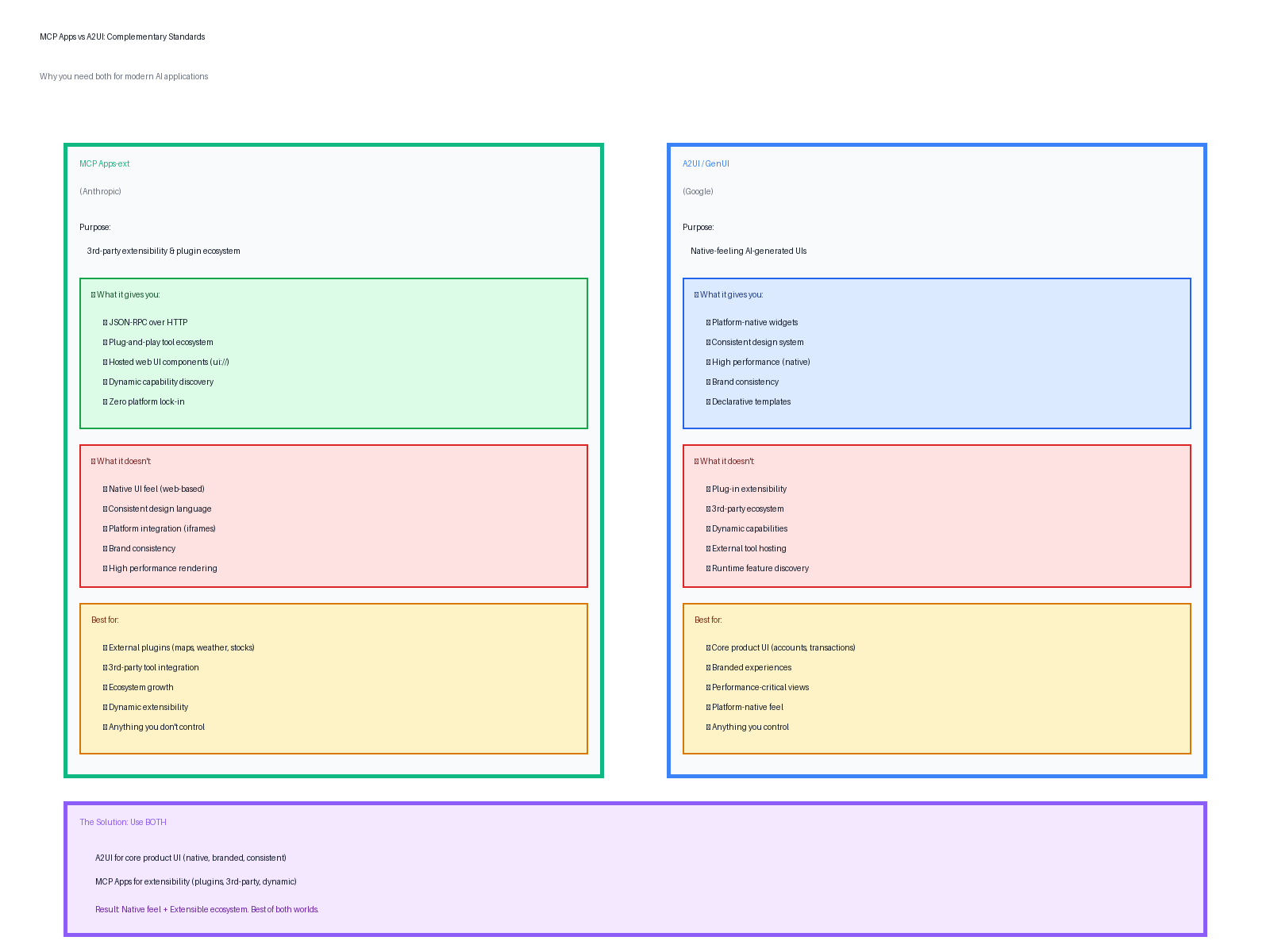
Figure 1: Why both standards are needed—they solve different problems
The Insight: No Choosing
Here's what I realized while building AIBank: these standards aren't alternatives. They're complements.
MCP Apps-ext and A2UI solve different problems in the same architecture. They can—and should—coexist in the same app. Use A2UI for your core product UI, the features you control, the experiences you want to polish. Use MCP Apps for the boundaries, the 3rd-party integrations, the places where you want ecosystem growth.
When a user asks "What's my account balance?" your agent generates an A2UI template. Your app renders it with native Flutter widgets. It's fast, polished, on-brand.
When they ask "Where was xxx transaction?" your agent calls an external map MCP server. It returns a hosted map UI. Your app embeds it inline. It's functional, interactive, and you didn't have to build it.
Same conversation flow. Same agent. Two different rendering strategies, chosen based on what you're showing.
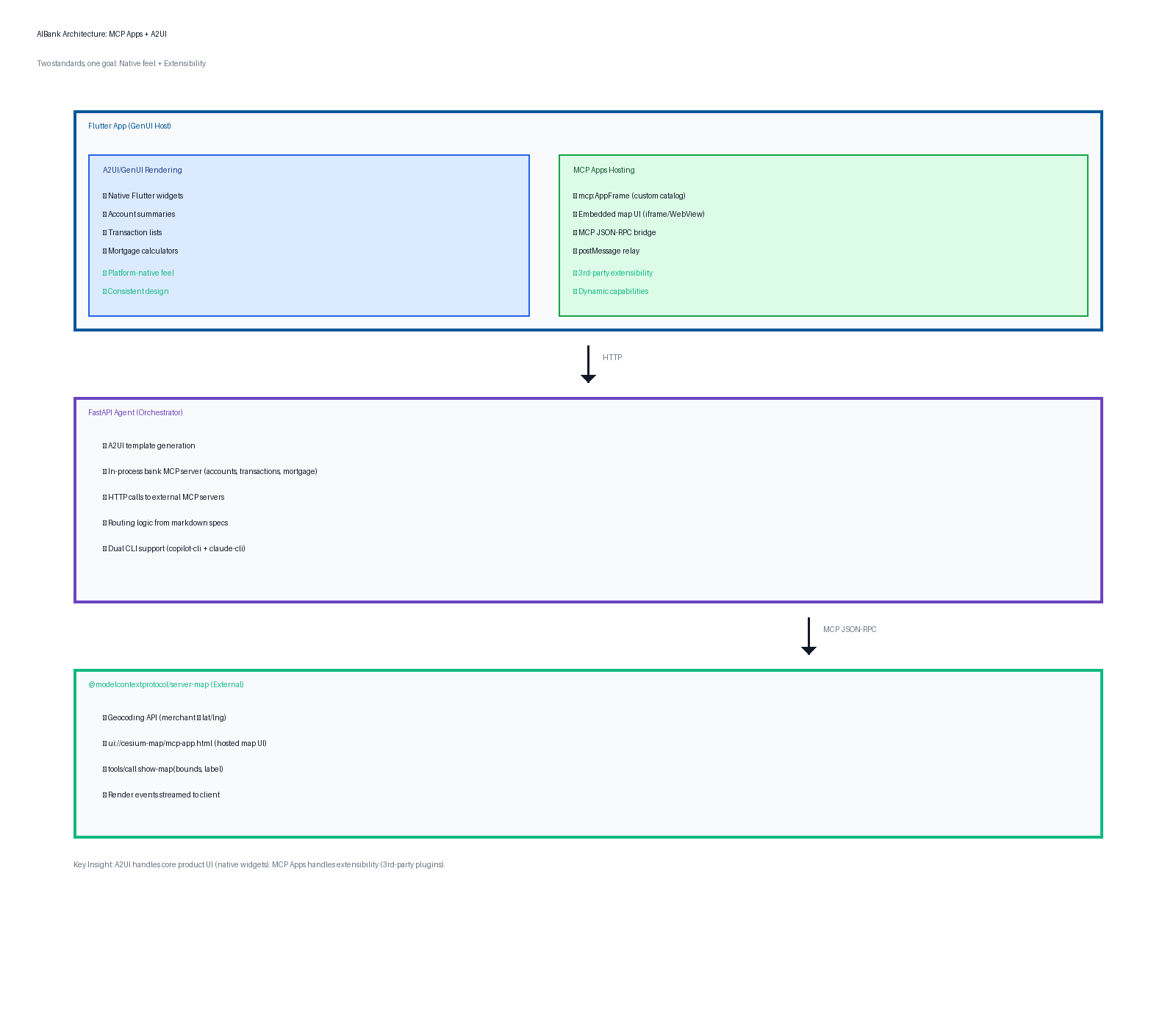
Figure 2: AIBank architecture—three layers working together
Here's what it looks like in action. The account balance and transaction list at the top are rendered using A2UI—native Flutter widgets that feel platform-native. The map at the bottom showing the "Council Tax" transaction location is an embedded MCP app UI from the external map server. Both in the same view, both feeling cohesive, both types of rendering working together seamlessly:
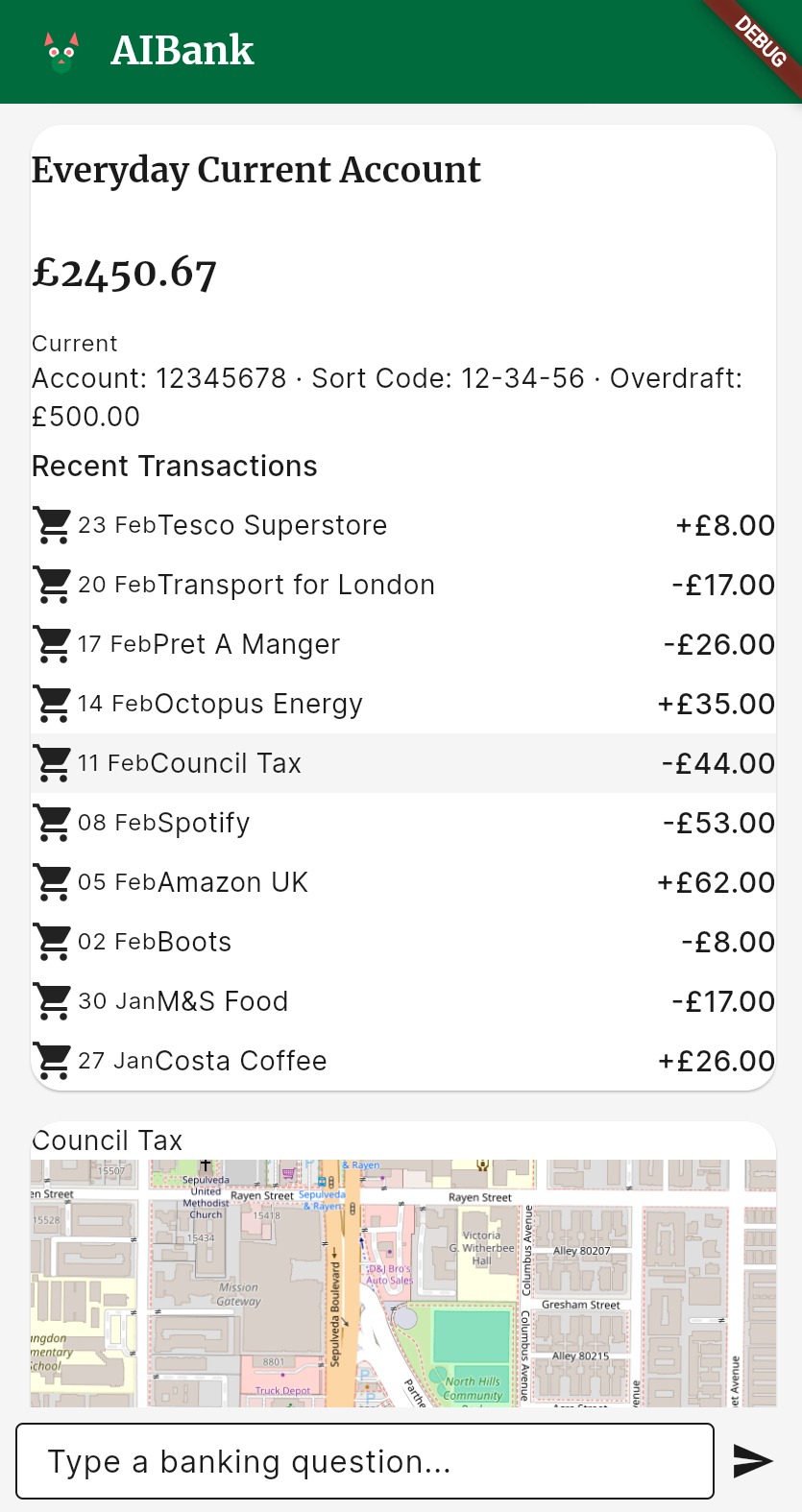
Figure 3: AIBank running—A2UI for core banking UI (top) + MCP Apps for location mapping (bottom)
Building AIBank: Architecture in Practice
Let me walk you through how this dual-standard approach works in practice. AIBank has three layers, each with a specific job.
Layer 1: The Flutter App
This is the user-facing layer. It's a Flutter app that hosts the GenUI SDK, which is Google's reference implementation of A2UI rendering. But we extended it with a custom mcp:AppFrame catalog item.
What's a catalog item? In GenUI, it's basically a UI component type that the agent can reference. Out of the box, you get things like list, card, button, text-field—the building blocks of most UIs. We added mcp:AppFrame to that catalog, which tells GenUI: "When you see this component in an A2UI template, render an MCP app UI inline."
The implementation varies by platform. On web, it's a sandboxed iframe with a postMessage bridge. On mobile native (iOS/Android), it's a WebView with a JavaScript shim that intercepts window.parent.postMessage calls. Either way, it creates a bidirectional JSON-RPC channel between the app and the MCP server.
So now when an A2UI template says "embed this MCP app here," GenUI knows how to do it. It loads the hosted UI from the MCP server, sets up the communication channel, and makes it feel like a first-class part of the app.
This is the key integration point. A2UI handles everything you want native and polished. MCP Apps handles everything you want pluggable and dynamic. The mcp:AppFrame component bridges them.
Layer 2: The Agent
The orchestration layer is a FastAPI server that sits between the Flutter app and the various data sources. It receives chat messages from the app, figures out what the user wants, gathers the necessary data, and returns A2UI templates.
This layer does a few different things depending on the request. For core banking queries—account balances, recent transactions, mortgage calculators—it calls an in-process bank MCP server. This is essentially a Python module that implements the MCP protocol locally. No HTTP, no network hop. It's fast, it's deterministic, and it returns structured data that the agent can format into A2UI templates.
For location-related queries—"Where was this merchant?" or "Show me branch locations"—it calls an external map MCP server over HTTP. This is @modelcontextprotocol/server-map, a reference implementation from the MCP Apps repo. The agent sends it a merchant name, gets back coordinates, then requests the hosted map UI using the ui://cesium-map/mcp-app.html resource path.
The agent doesn't know or care whether it's calling an internal MCP server or an external one. It's all just MCP JSON-RPC. And it doesn't know or care whether the result will be rendered as A2UI or as an embedded app. It just returns whatever makes sense for the data type.
This separation of concerns is powerful. The agent focuses on what to show. The app focuses on how to render it. The MCP servers focus on where the data comes from. Clean boundaries, loosely coupled components.
Layer 3: The MCP Servers
At the bottom layer, we have the actual capability providers. The bank MCP server is custom-built for this demo. It has tools for getting account data, retrieving transactions, calculating mortgages, checking credit card balances. Standard banking stuff, but implemented as MCP tools.
The map MCP server is off-the-shelf. We didn't build it. We just pointed our agent at http://localhost:3001/mcp and started calling its tools. It provides geocoding (merchant name → coordinates), map rendering (coordinates → interactive Cesium map), and a few other location-related utilities.
That's the ecosystem play. The bank server is ours. The map server is someone else's. But they both speak MCP, so they both plug into our agent seamlessly. As the MCP ecosystem grows, we'll be able to add weather, stock tickers, news feeds, whatever—without changing our app code or redeploying our agent.
If you're building an AI app today
Here's my advice: no need to pick a side. Don't choose between MCP and A2UI. They're not competing visions.
Think of A2UI as your internal rendering strategy. It's how you build the core product experience—your accounts page, your transaction history, your settings screen. It gives you native performance, brand consistency, and tight integration with your platform.
Think of MCP Apps as your external integration strategy. It's how you add maps, weather, news, stocks, or any other capability where you want to tap into the ecosystem rather than build everything yourself. It gives you flexibility, speed to market, and access to specialized tools you'd never have time to perfect.
Together, they give you both sides of the impossible trinity. You get native feel (A2UI) and extensibility (MCP Apps). The only thing missing is agent intelligence, and that's what your LLM provides. Use Claude, use GPT, use Gemini—doesn't matter. As long as your agent can emit A2UI templates and call MCP servers, you're in business.
The Future
The AI UI space is moving fast, and everyone's got an opinion about which standard will win. MCP vs A2UI. Claude vs GPT. Flutter vs React Native. It's exhausting.
But here's what I learned building AIBank: the winners won't be the ones who pick a side. They'll be the ones who understand what each tool is good at and combine them intelligently.
Use A2UI for your core product. Use MCP Apps for your ecosystem. Use whatever LLM makes sense for your use case. Stay flexible. Stay portable. Stay focused on what actually matters: building something that works and feels good.
Because at the end of the day, users don't care about standards. They care about whether your app helps them get things done. And if using two standards together lets you ship faster and build better, that's not a compromise—it's a win.
Try It Yourself
Want to see this in action? Clone AIBank and run:
./dev.sh
This starts the agent backend, the map MCP server, the MCP inspector (for exploring tools in your browser), and the Flutter web app. Open http://localhost:3000 and try these queries:
"Show me my account balance"—watch A2UI render native transaction widgets.
"What transactions did I make last week?"—see structured data formatted beautifully.
"Where was my Pret purchase?"—experience an MCP app embedding a live map inline.
All in the same conversational flow. All feeling like one cohesive app. Because that's what happens when you stop choosing and start combining.
Links: